Playbook
No-code or custom code? The complete guide to deciding how to automate
Zenith Automate | April 22, 2026 · 10 min read
No-code tools like n8n, Make, and Zapier are great, until they aren't. A deep decision framework for choosing between a no-code flow and custom Python or Node.js: the warning signs you've hit the wall, total cost of ownership over time, the hybrid architecture that gets the best of both, and several worked examples.
People expect a developer to always reach for code. I don't. A huge share of useful automation should be built in n8n, Make, or Zapier: they are faster to ship, easier to hand over, and cheaper to run. The skill is not preferring one camp, it is knowing exactly where the no-code wall is, and stepping over it with code only when you have to.
Get this decision right and projects come in faster and cheaper and stay maintainable for years. Get it wrong and you either torture a no-code flow into something it was never meant to do, or you over-engineer a custom build for a job a single Zapier could have handled. This guide is the full framework I actually use, including the parts that only show up months later.
Key takeaways
- Use no-code by default. Most automation is connecting apps that already talk to each other.
- Drop to code the first time the tool makes a simple thing genuinely hard, not before, and not as a reflex.
- The warning signs are consistent: logins, no connector, heavy data work, scale, or an unmaintainable sprawl.
- The best builds are usually hybrids: no-code orchestration calling one small custom-code step. You get readability and power.
- Think in total cost of ownership over years, not just the cost of the first build.
When is no-code the right call?
If the whole job is connecting apps that already have connectors, use no-code.
If the work is "when a form is submitted, create a row, send a Slack message, and email the lead," that is a no-code flow. n8n, Make, or Zapier will do it in an afternoon, anyone on the team can read the diagram, and there is no server to babysit.
No-code wins clearly when:
- The apps involved have ready-made integrations.
- The logic is mostly linear: trigger, a few steps, done.
- Volume is modest and the data is well-behaved.
- You want the client or team to be able to see and tweak the flow themselves without a developer.
That last point is underrated. A no-code flow your team can understand and adjust is often more valuable than a "better" custom script that becomes a bottleneck because only one person can touch it. If that sounds like your project, the next question is which platform, and the answer is not obvious. I broke that down in detail in n8n vs Make vs Zapier: the complete decision guide.
Simple is better than complex. Complex is better than complicated.
When does no-code start to hurt?
The moment you are fighting the tool instead of using it.
The warning signs are consistent. Once you hit two or three of these, custom code is usually cheaper over the life of the project, even if it is slower to start:
- Logins and anti-bot. You need to scrape or access something behind authentication, pagination, or bot protection. This is a whole craft of its own, see the web scraping field guide.
- No connector exists. The system you need to talk to has no integration, just a raw API, a webhook, or a file format nobody supports.
- Real data shape. You are parsing messy XML, reconciling records across sources, or applying logic with many branches and exceptions.
- Scale. Thousands or millions of records, where per-operation pricing or rate limits make a no-code platform expensive or slow.
- Maintenance cost. The flow has grown into a sprawl of sixty nodes that only one person understands. At that point, code is more readable, not less.
The decision table I actually use
| Signal | Lean no-code | Lean custom code |
|---|---|---|
| Connectors exist for every app | ✅ | |
| Behind a login / anti-bot | ✅ | |
| Linear logic, few branches | ✅ | |
| Heavy parsing or reconciliation | ✅ | |
| Low / modest volume | ✅ | |
| High volume or tight rate limits | ✅ | |
| Client wants to edit it themselves | ✅ | |
| Needs tests, versioning, CI | ✅ | |
| Sensitive data, strict residency | ✅ | |
| Needs to ship this week | ✅ |
It is rarely all-or-nothing. The best builds are often hybrid, and that deserves its own section.
Total cost of ownership: the part people forget
Most people compare no-code and code on the cost to build. That is the wrong comparison. The right one is the total cost over the life of the thing, which has three parts:
- Build cost. No-code usually wins here for simple flows; it is faster to ship.
- Running cost. Metered no-code pricing climbs with volume. Custom code on your own infrastructure has a flatter cost curve. At scale, this reverses the build-cost advantage.
- Maintenance cost. A small, readable flow is cheap to maintain. A sprawling sixty-node scenario is expensive and fragile. Well-structured code with tests can be cheaper to maintain than a tangled flow, which is the opposite of what people assume.
The decision is not "which is cheaper to build" but "which is cheaper to own for the next two years, given how this will grow." A flow that will run constantly and keep growing should weigh running and maintenance cost heavily. A one-off or low-volume job can optimise purely for speed to ship.
The hybrid architecture: the best of both
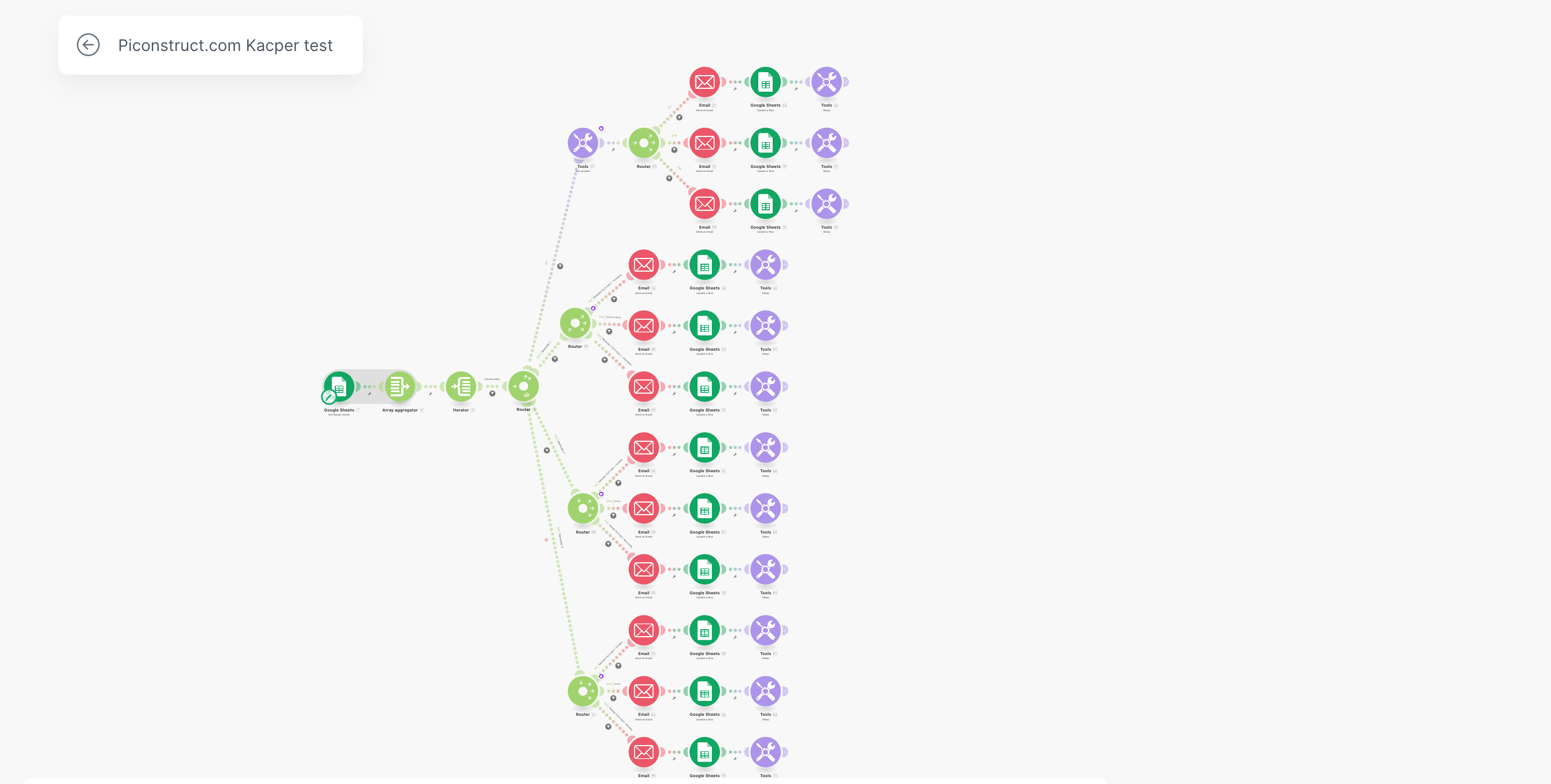
Here is the pattern that solves most hard cases. You do not have to choose no-code or code for the whole project. You split the work along the wall: the no-code platform orchestrates and handles the friendly parts, and it calls out to a small custom service for the one genuinely hard step.
- 1
No-code orchestrates
The trigger, the scheduling, the notifications, the routing, the writing to Sheets or a CRM: all the parts that are simple, readable, and that your team can edit without a developer.
- 2
A tiny custom service does the hard part
The scrape behind a login, the messy parse, the calculation no block can do. Built as a small API or function with proper tests and error handling.
- 3
They talk over a webhook or API call
The no-code flow calls the service and uses the result. Each side can change independently without breaking the other.
The payoff is real: the client edits the Slack message or the schedule without going near the scraper, and I can harden the scraper without touching their flow. That separation is not a compromise, it is the cleanest possible design, and it is how a large share of my builds are structured.
Three worked examples
1. Competitor price monitoring to Slack
A client wants a daily competitor-price summary in Slack.
- No-code: the schedule, the Slack message, the formatting. Trivial and readable.
- Code: the actual scraping behind a login, with validation, exposed as a tiny API.
The no-code flow runs on schedule, calls the scraping service, and posts the result. A textbook hybrid.
2. Lead routing from a form
A form submission needs to create a CRM record, notify a salesperson, and send a tailored email.
- No-code: all of it. Every app has a connector, the logic is linear, and the team will want to tweak the email copy. Pure no-code, done in an afternoon. Reaching for custom code here would be over-engineering.
3. Reconciling bank statements with invoices
Incoming payments in a bank statement must be matched to invoices across fifteen-plus parameters and synced to a project tool.
- Code: the parsing of the statement format and the matching logic are far beyond what a block can do reliably.
- No-code: the final notification and status sync, once the matching service has produced a result.
This is the shape of the Zabezpiecz Auto back-office automation: real code for the hard reconciliation, light orchestration around it.
How to migrate from no-code to code when you outgrow it
Outgrowing a no-code flow is a success, not a failure: it means the automation became important enough to be worth more. The mistake is treating the migration as a big-bang rewrite. It rarely needs to be.
The clean path is the strangler pattern, borrowed from how you modernise legacy software. Instead of rebuilding the whole flow at once, you carve out the one part that is causing pain, rebuild just that as a custom service, and have the existing no-code flow call it. The flow keeps running; one painful node becomes one reliable API call. Over time, if more parts need it, you carve out more, but often that first extraction is all it takes.
- 1
Find the painful step
The node that keeps breaking, costs the most in per-operation fees, or that nobody can safely change. That is your first extraction.
- 2
Rebuild just that step as a small service
A tiny API or function with tests and error handling, doing the one hard thing well.
- 3
Point the flow at it
Replace the painful node with a call to the new service. Everything else stays exactly as it was.
- 4
Stop there, usually
Most flows need exactly one extraction to go from fragile to solid. Resist rewriting the parts that already work fine in no-code.
This keeps risk low and value continuous. You never have a scary cut-over weekend, and you never throw away the parts of the no-code flow that were genuinely the right tool.
The team and skills angle
There is a human factor that the technical comparison misses. A no-code flow can be owned by a non-developer; custom code usually cannot. If the automation lives inside a team with no engineer, a readable no-code flow they can maintain themselves may beat a more capable custom script that becomes a single point of failure the day the one person who understands it leaves.
Flip it around, though: if the logic is genuinely complex, no-code does not make it simple, it just hides the complexity in a place that is harder to test, version, and reason about. Complexity has to live somewhere. The question is whether it lives somewhere you can manage it.
Frequently asked questions
So, which should you use?
Use no-code by default. Reach for code when the problem is behind a login, has no connector, needs real data work, runs at scale, or has become unmaintainable as a flow. And do not be afraid to mix the two: picking the right tool for each step beats loyalty to either camp.
If you are not sure which side of the line your project sits on, that is exactly the kind of thing a short audit answers fast. Explore process automation (no-code) and custom automation (code), see how pricing works, browse real builds, or tell me what you want to automate.
Have a process worth automating?
Tell me about it, I’ll reply within 24 hours.